
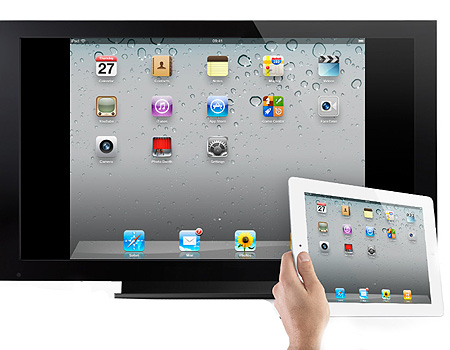
The displays, cameras and collaboration platforms will change long before the conference room does. Design the room so today’s technology works without making tomorrow’s difficult to adopt.
Originally published January 2012. Updated October 2026 to reflect current conference room technology and workplace collaboration.
When I originally wrote this article, the challenge was getting newly popular tablets and smartphones to work with conference-room displays.
The devices have changed considerably since then.
The larger issue has become even more important.
A conference room may remain in service for 10 or 15 years. During that time, displays will change. Conferencing platforms will evolve. Cameras, microphones and control systems will be replaced. Employees will arrive with devices and connection standards that may not exist when the room is designed.
So the owner should ask:
“Are we designing a conference room for the equipment we’re buying today, or a room that can accommodate what comes next?”
Start With What the Room Needs to Do
Technology discussions can quickly become equipment discussions.
Start with how the room will be used.
Will people primarily hold internal meetings? Present from personal devices? Conduct video conferences? Share content with remote participants? Host clients? Conduct executive presentations? Will the room need to support uses that may change over time?
A six-person huddle room does not need the same solution as a large boardroom.
Define the use before selecting the equipment.
Then consider which requirements are likely to remain relatively constant even as the technology changes.
Build Flexibility Into the Infrastructure
The visible technology is likely to change several times during the life of the room.
The infrastructure behind it is harder to change.
During design, consider:
- Power at displays, tables and equipment locations
- Data connectivity and network capacity
- Accessible pathways for additional or replacement cabling
- Equipment locations with room for replacement or expansion
- Ventilation where equipment generates heat
- Blocking and structural support that can accommodate different displays or devices
- Access for maintenance and replacement
- Acoustics appropriate for voice and video collaboration
- Lighting that works for both occupants and cameras
The objective is not to predict every future technology.
It is to avoid building physical constraints that make ordinary technology changes unnecessarily expensive.
An accessible pathway or modest amount of additional capacity during construction may cost relatively little. Opening finished walls, ceilings or conference tables later can cost considerably more.
Don’t Lock the Room Into One Technology
Today’s preferred connection method, conferencing platform or room-control system may not be tomorrow’s.
That doesn’t mean avoiding standards. Standardization can make rooms easier to support and operate across an organization.
It does mean understanding where that standard creates dependency.
Ask what happens if the organization changes collaboration platforms, replaces the display system or adopts a different type of user device.
Can the room adapt through equipment replacement?
Or does the change require construction?
That distinction matters.
Think Beyond Cables
Future flexibility is not just about leaving an empty conduit in the wall.
Network demand may increase. Wireless technology will continue to change. Video and audio systems may become more sophisticated. More processing may move between local devices, building systems and cloud-based platforms.
Power requirements may change as well.
The technology team should therefore be involved early enough to consider the room as part of the organization’s broader technology environment, rather than treating audiovisual equipment as something added after the architectural design is complete.
The same applies to furniture. A conference table with integrated technology can become a constraint if future equipment cannot be accommodated without replacing or modifying the table.
Make Replacement Possible
One of the best future-readiness questions is simple:
“How would we replace this?”
If the display changes size, can the mounting condition accommodate it?
If the camera or microphone system changes, can new cabling reach it?
If the equipment behind the display needs replacement, can technicians access it?
If the table technology changes, can power and data be modified without replacing the furniture or opening the floor?
If the room eventually requires additional devices, is there somewhere for them to go?
These questions do not require anyone to know what the next generation of technology will be. They require the design team to think about change before construction makes change difficult.
Test the User Experience
Future flexibility does not excuse complexity today.
Before turnover, test the room from the perspective of someone walking in for the first time.
Can they start a meeting?
Can they connect or share content?
Can remote participants hear and see the people in the room?
Can someone recover quickly when something doesn’t work?
The technology team may understand the system perfectly. The room still has to work for everyone else.
Plan for What You Cannot Predict
Nobody designing a conference room today can tell an owner exactly what workplace collaboration technology will look like 10 years from now.
That isn’t the goal.
The goal is to distinguish between the things that can be replaced relatively easily and the things that become embedded in the building.
Displays, cameras and conferencing equipment will change.
Walls, floors, pathways, power distribution, furniture and structural conditions are much harder to change.
Design those elements with enough flexibility that the next technology decision remains a technology project instead of becoming another construction project.
Leadership Takeaway: Future-proofing a conference room does not mean predicting the next technology. It means designing today’s infrastructure so tomorrow’s technology can be installed without unnecessarily rebuilding the room.
About the Author: Richard Neuman advises organizations on capital planning, project governance, and complex capital programs. He has overseen more than $2 billion in capital investments across commercial real estate, healthcare, utilities, industrial, broadcast, and development projects.
He writes candidly from an owner-side perspective about the executive decisions and organizational dynamics that shape capital project outcomes.
Leading a major capital program or facing a complex capital decision?
Contact Richard.
Subscribe for insights on capital planning, project governance, and the executive decisions that shape project outcomes long before construction begins.



According to my opinion meeting space are very important space in our office. In your office meetings you can use teleconferencing tools, such as Skype, for important face-to-face meetings with clients, and avoid the carbon footprint nightmare of long-distance travel. Thanks for sharing.
Melbourne Meeting Rooms
It’s clear that tablets and other type of technology are the wave of the future. Although, I cannot get away with not putting projectors in some of my Directors or VP’s office just yet, we are making progress towards LED monitors/TV’s for their use. I relish the day when an iPad is hooked up to the TV & we can make more changes on the fly then after the meetings. I think a raised flooring in office space will help to provide more agility and flexibility to adapt to the newer technology.
We stopped putting overhead projectors into most collaborative spaces or Sr Leaders offices and it’s been a major cost avoidance. We no longer need to replace costly projector bulbs, send them out for repair or PM them. The TV’s just hang on the wall, are as inexpensive as the overhead projectors and last for years. We also have spaces where we have two different monitors side by side and it allows staff to compare spreadsheets, data, code, etc. Even small firms can afford the monitors and mounts available today.
Indeed George, and Rich. Our clients are always extremely impressed with our technologically advanced meetings. We included all of your suggestions when constructing the new office and it has certainly paid off. The clients have an increased respect and admiration for their architects, a heightened sense of control and stability in their projects, as well as a more exciting experience incidentally because of all the technology surrounding them. There’s no question that these initiatives pay for themselves many times over….and quickly. It’s not difficult to understand how much more easily it is to refer a firm possessing and implementing these technologies than one who does not. Not only do these decisions improve the overall image of the company…but also makes our jobs, particularly presentations and negotiations a lot smoother. Not to mention entertaining. Good post!
I agree: well said, Rich.
Successful implementation of such high-tech projects frequently depend more on low-tech things like conduit feeds, power outlets and network jacks than on the magical gizmos pouring out of Silicon Valley!
My firm provides planning, design and project management services for multimedia communications technology systems in corporate environments. Our services are most often provided as part of the design team within a new tenant fitout or renovation project, and they almost always come as an afterthought to the other design disciplines involved in such projects. Retrofitting a space for the proper integration of technology after the walls, ceilings and floors are closed is at least an order of magnitude more expensive than doing it up front during the base-building work.
However, there are some new and innovative products on the market that make it easier to retrofit signal connectivity while maintaining a professional environment free of tripping hazards, including large-capacity electrical poke-throughs and low-profile surface mounted raceways. There are also some new in-furniture products that make it easier to manage the tangled rats-nest of cables that often results from having a connected conference room. The key is to put the technology where the users need to have it: close at hand when it’s in use without being in the way when it’s not.
It’s a brave new world out there, but it’s not all that scary if you take a methodical approach and look at the deisgn from the users’ perspective instead of the techno-geek’s perspective.
Best Regards,
Rob
Rob-
I’d be interested to know what technology you find helpful. For instance, at a recent project the waffle floor construction prohibited us from installing 2″ conduits and we were limted to 1″ which made it impossible to snake a VGA wire with a connector attached. We overcame the issue with RapidRun cable and flying leads. It’s amazing and overcame our problem by snaking this 1/2″ diameter cable and screwing in a lead on the end that had VGA, mini, RCA (L/R audio and video) and USB connectors. The second wire housed the HDMI. What a project saver!
Hi, Richard.
Cable pathways are not usually a problem for us, as the installation contractors with whom we work will almost always use bulk cable that they terminate in the field; consequently, the largest conduit we ever need to specify is 1-1/4″ diameter. The RapidRun cable strikes me as cost-prohibitive for the large-scale projects on which we work, but it looks like it worked well for you; honestly, I had never even heard of it prior to your mentioning it. When we REALLY get in a bind for conduit capacity, we’ll convert the signal onto unshielded twisted pair and transport it over CAT5 cabling.
The items we find most useful are things like large capacity poke-throughs from that accommodate the Extron AAP/MAAP termination plates, the in-wall termination and connection boxes from companies like Peerless and Chief that go behind flat-panel monitor mounts and allow today’s ultra-thin monitors to sit flush against the wall, and table pop-up units like Extron’s Cable Cubby that allow the interconnection cables to be ready when needed but not in the way or creating clutter when not.
I’d be happy to spend some one-on-one time with you if you have any specific applications that need solutions.
Best Regards,
Rob
Well covered Rich. The newer workforce generation is coming from a wired, mobile and video enriched college environment where multimedia is the norm not the exception. Companies that adapt to this environment can expect a higher level of productivity and social engagement from this group, whether they be employees, vendors or customers. Making your boardroom available for the virtual technologies that exist and are coming will provide a company a competitive edge in attracting talent, retaining talent, reaching new clients and enhancing the customer experience.