The drawings can show every outlet and still be wrong for the way the office will actually be used.
Originally published October 2011. Updated October 2026 to reflect current workplace technology and coordination requirements.
Architectural floor plans are important for the tenant to review and approve. So are the electrical and technology plans that support them.
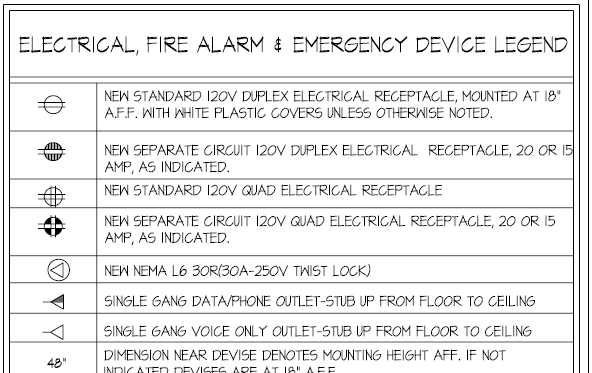
A power or data outlet shown on a drawing may appear to be a small detail. Once construction is underway, moving that outlet can involve wiring, wall repairs, patching, painting and sometimes changes above the ceiling or below the floor.
Multiply that across an office and a coordination problem can quickly become a change-order problem.
The owner should ask:
“Have we coordinated the outlets with the furniture, equipment and technology that will actually be installed?”
Furniture Placement Matters
The design team can establish anticipated power and data locations based on the floor plan.
Those locations still need to be coordinated with the actual furniture.
Workstations, conference tables, reception desks, credenzas and other furniture can determine where connections need to emerge and whether they remain accessible after installation.
This becomes particularly important when furniture selections lag behind construction documents.
If the final furniture layout changes after electrical work is installed, outlets may end up behind panels, on the wrong side of a workstation or several feet from the equipment they are intended to serve.
Get the furniture information into the coordination process early enough to influence the drawings.
Inventory What Will Be Plugged In
Don’t stop at the furniture plan.
Look at what will actually be used in each space.
A typical workstation may need power for monitors, docking equipment and other devices. Conference rooms may require connections for displays, conferencing systems, table power and charging. Printers, copiers, appliances and specialized equipment may have their own electrical or technology requirements.
Some equipment may require dedicated circuits, specific voltage or additional capacity.
The objective is to identify those requirements before the electrical installation is substantially complete.
Coordinate Technology Requirements
Technology requirements have changed considerably since this article was first published.
Wireless networks have reduced dependence on wired connections for many users, but they have not eliminated structured cabling.
Wireless access points, conference-room systems, printers, security devices, audiovisual equipment and other building technology may still require network connections and power.
Coordinate those requirements with the IT and technology teams rather than relying on a standard number of data outlets per workstation.
The question is no longer simply “How many data jacks do we need?”
It is:
“What equipment will be installed here, and what does it need to operate?”
Review Before the Walls Close
The drawings should be reviewed during design, but there is another useful checkpoint during construction.
Before walls and ceilings are closed, walk representative areas with the appropriate project, furniture, electrical and technology team members.
Compare the installed locations with the latest furniture and equipment information.
Finding an outlet in the wrong place while the wall is still open is much easier than finding it after finishes and furniture are installed.
Leadership Takeaway: Electrical and data drawings should reflect how the completed space will actually be furnished and used. Coordinate furniture, equipment and technology early, then verify critical locations in the field before correcting them becomes expensive.




Liked your article, had a similar experiance early on – one thing I found helpful is – since electricians go for a convienent stud if outlet is not dimensioned – to specify a “window” on the wall that cannot interfere with furniture peds, etc and secify that all electrical and data outlets must fall in that window